Moneybird for agents
Give an AI assistant access to Moneybird, or hook up your own software. Ask your bookkeeping anything in plain language, or just let the recurring work run on its own.
No setup, just get going
I want to connect Moneybird to this app via MCP. Read the current instructions at https://developer.moneybird.com/tools/mcp and set up the connection for me. Ask me whether I want read-only or read-and-write access.
I want to install and use the Moneybird CLI on this system. Read the current instructions at https://developer.moneybird.com/tools/cli and run the installation and configuration. Ask me for input where needed (such as an API token) and keep sensitive data out of logs and shell history.
Three ways to connect
Talk to your bookkeeping
Connect an AI chat like Claude, ChatGPT or Gemini to Moneybird and just ask in plain language. "How much is still outstanding?" or "Draft an invoice for Acme." The assistant reads along and sets up drafts when you want, while you stay in control.
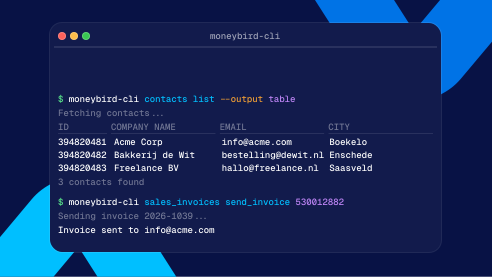
Done in no time from the terminal
Explore your administration and knock out one-off tasks straight from the command line, built for people and AI agents alike. Quickly pull a list, create an invoice or try something out, without building a whole integration.
Automate it end to end
The REST API runs in the background: send invoices, sync contacts and connect your own software to your bookkeeping. Handy for running your SaaS subscriptions fully automatically, for example.
What you can do with it
Dig into your numbers
Connect your own system, without the pricey custom work
One token, access everywhere
For the MCP connection, the CLI and the API you create a token once in Moneybird, via Settings > External and AI integrations. You decide right away which parts your tool can reach.
